¶ Services Summary
I have a variety of services available, primarily cloud storage & streaming services. Please let me know what you want access to and I can help you set up your account. The below guide explains what each service is and how to use it.
If something isn't working please check the Status Page before telling me.
¶ Nextcloud
Similar to Microsoft OneDrive, Nextcloud allows you to back up your computer & phone in a secure way, as well as allowing you to share & collaborate on documents like Google Docs.
¶ Streaming Movies & TV
Streaming media is available through Plex on the web, TV, or phone. Requests are handled through the Overseer at req.spooner.network. Please be cognizant of how much storage you take when requesting movies as storage is expensive!
¶ Books
Books are available through books.spooner.network. Currently, requests have to be managed through me, however, if you want another way to grab a book you can always check out Anna's Archive
¶ Nextcloud
Nextcloud is a suite of client-server software for creating and using file hosting services. Nextcloud provides functionality similar to Dropbox, Office 365 or Google Drive when used with integrated office suites Collabora Online or OnlyOffice.
¶ Requesting an account
Please contact me directly to set up your initial account. You will receive an email with login instructions. Nexcloud is accessed through cloud.spooner.network and you can download the desktop & mobile clients here.
¶ Initial Setup
Once you create your initial account, please ensure that 2-factor authentication is turned on in the security settings. This will ensure that everyone's data is secured. When you enable two-factor authentication please scan the QR code given in authy or any other TOTP app. In case you're worried about the files you put on the server, every user's partition is encrypted and no other user (including me) has access.
¶ Usage
When installed on a Windows computer, nextcloud will make itself available similar to OneDrive, in your Windows Explorer.
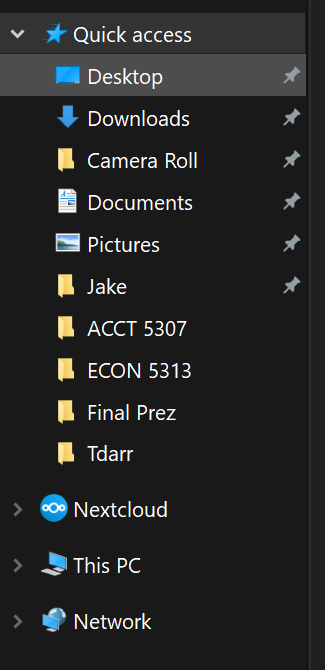
You will be able to drop files into it as well as free up space on your computer.
When using the mobile app you can go into settings to set up automatic photos backup, however this will only work while the app is open.
Finally, to share files, look for the share icon in the web app or mobile app to create a link and send it. By default, it will have a password and expiration, but you can change this as needed.
¶ Streaming Movies & TV
Plex Media Server is a software application that allows you to organize and stream your collection of movies, TV shows, music, and photos, from a central location. Think of it like having your own personal Netflix or Spotify server that you can access from various devices. It's a great tool for anyone who wants to streamline their media consumption and take control of their entertainment experience.
¶ Requesting an account
Begin by setting up a Plex account and telling me your plex account name. I will then send you a link to confirm library access to your email address. Once confirmed, you will be able to access content through the various applications and on the web at app.plex.tv. Be careful because Plex likes to push its free content & Tidal, so you'll want to look for the tabs that say Movies, TV Shows, Audiobooks, & Music. Once your Plex account is connected, I'll be able to set you up with an account to access req.spooner.network where you will be able to make media requests. Additionally, you will have to sign in twice. First through Cloudflare using either a Google or GitHub account, and then through overseer with your Plex account. This double sign in is to protect all of our security.
¶ Initial Setup
Once your accounts are connected all you have to do is sign into Plex on their various applications for TV, Mobile, & PC. Additionally, if you have a slower internet connection (<200 Mbps) you may have to manually reduce your bandwidth in the Plex app under settings. But if your internet connection is this slow you should probably just buy better internet  .
.
¶ Usage
Once your Plex account is set up and connected to my library, you'll have access to new tabs on the left side of your screen.
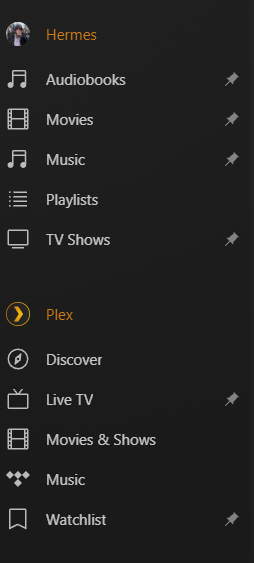
As you can see plex differentiates between what's available on my server (Hermes), and what's available through their services. Plex is trying to be some kind of streaming media homepage as well as offering a bunch of their free content. I generally avoid it and just focus on what is available through my server (Audiobooks, Movies, Music, & TV Shows). Of course, my server may not have what you already want and that's the entire purpose of req.spooner.network!
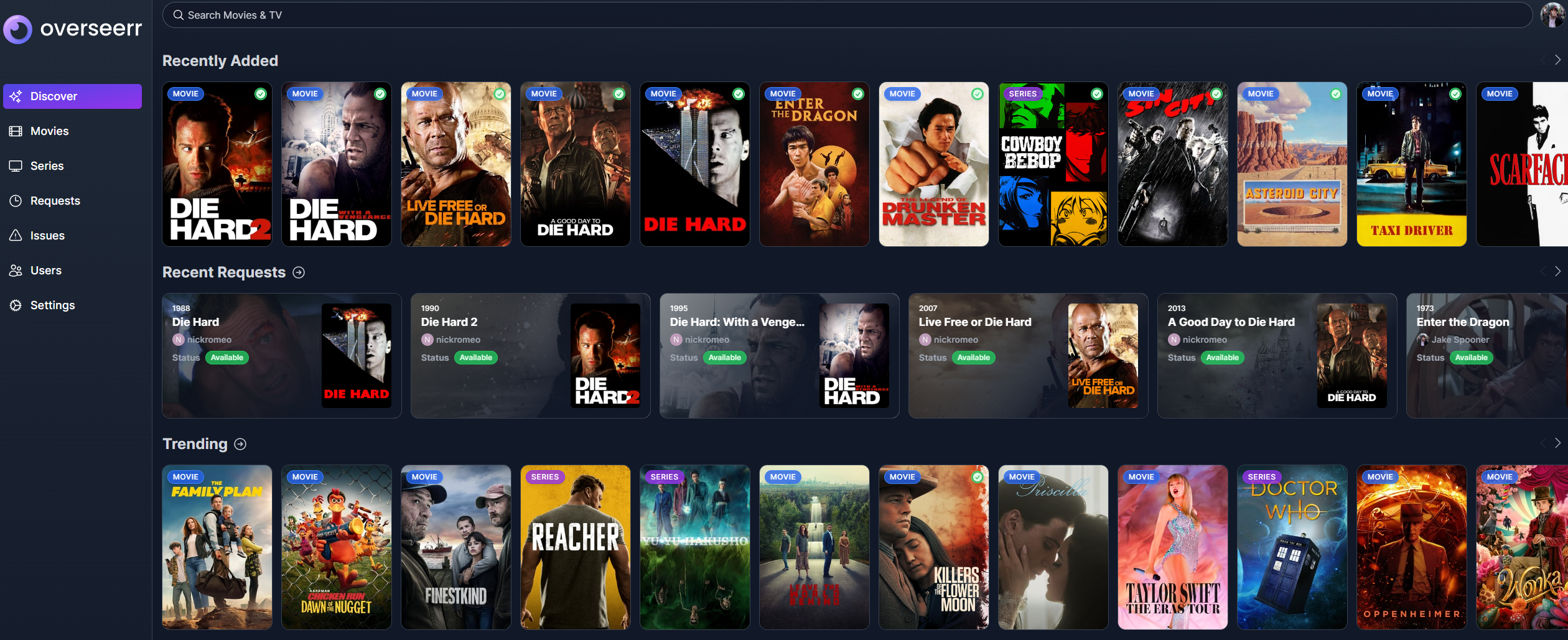
Simply request the movie that you would like and once approved, it will be downloaded! It will even show you the download status on the webpage! Once your movie is finished downloading you'll receive an email and be able to watch it through Plex.
You can also request movies that aren't available yet, and my server will grab them and email you as soon as it is!
¶ Books & Audiobooks
Neither books & audiobooks don't have a lot of automation available, so every book and audiobook is manually added by me. Still, feel free to let me know if there's something you're looking for and I'll add it as soon as I can.
¶ Requesting an account
Ebooks through books.spooner.network are available through open registration on the site, and I will approve your account once you request. It's pretty simple to download books or read them through the site, but most importantly if you have a Kobo E-Reader (Like I do!) you can change its store API so that it thinks the books available on the site are ones you own allowing you to download them easily. You can follow the guide here.
Audiobooks are available through either Plex or Nextcloud, and I can give you details on how to connect to both. On iOS I use BookPlayer to download files locally from nextcloud and play them, and Prologue to stream through Plex. Prologue is probably easier to use, but it costs $5 to access some premium features.